> ## Documentation Index
> Fetch the complete documentation index at: https://fireworks.ai/docs/llms.txt
> Use this file to discover all available pages before exploring further.
# Side-by-side demo
> Race two models through Claude Code on the same prompt with fireconnect claude demo
**`fireconnect claude demo`** runs the same code-generation prompt through two models using your current FireConnect Claude profile. It then puts the results next to each other so you can judge speed, cost, and output quality yourself.
The demo reads your active FireConnect Claude profile but does not modify `~/.claude/settings.json`. Each side runs in a separate temporary working directory.
## What you get
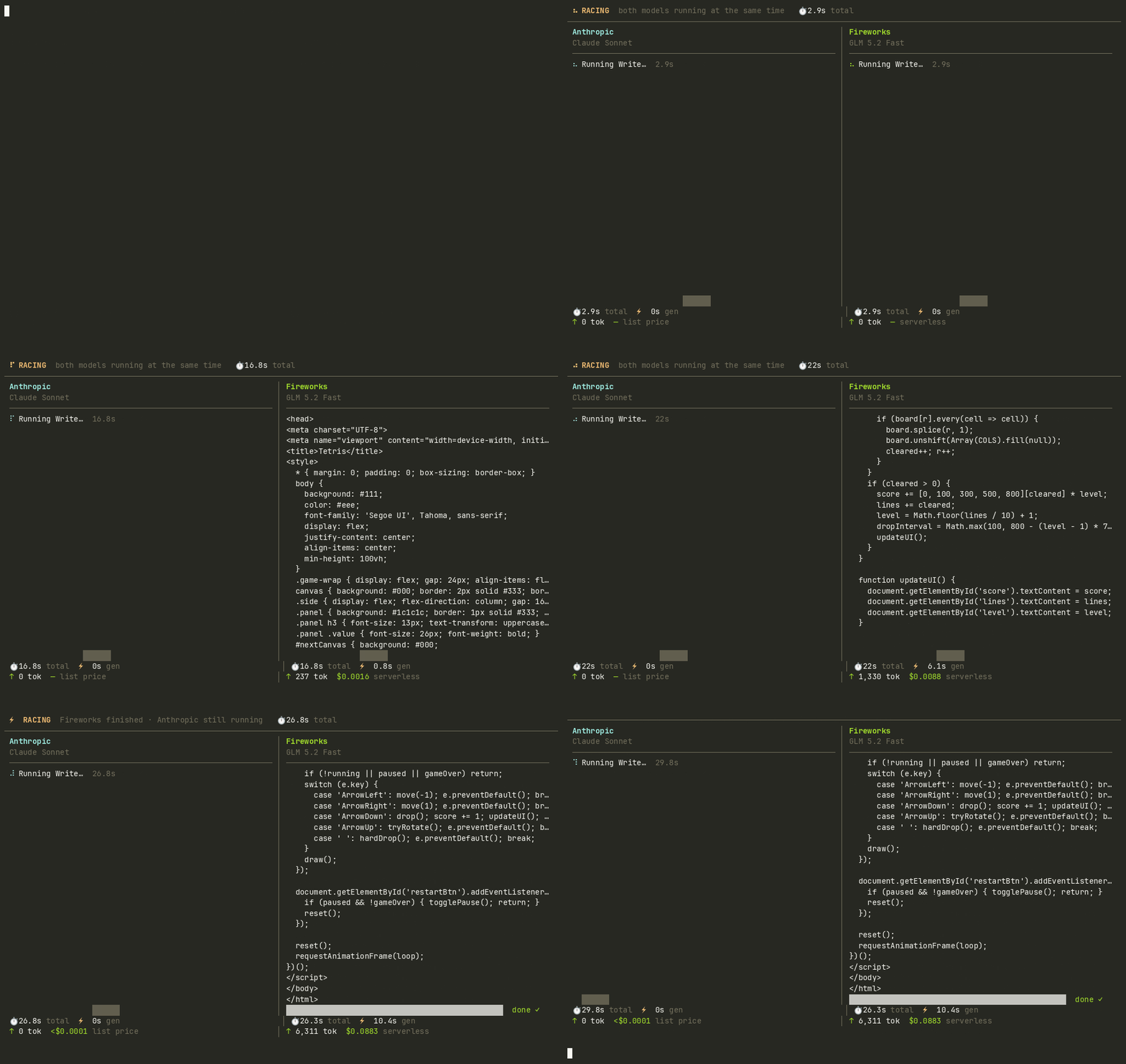
1. **Live terminal race**: both models stream code in a split-pane TUI with real token counts and wall-clock timers.
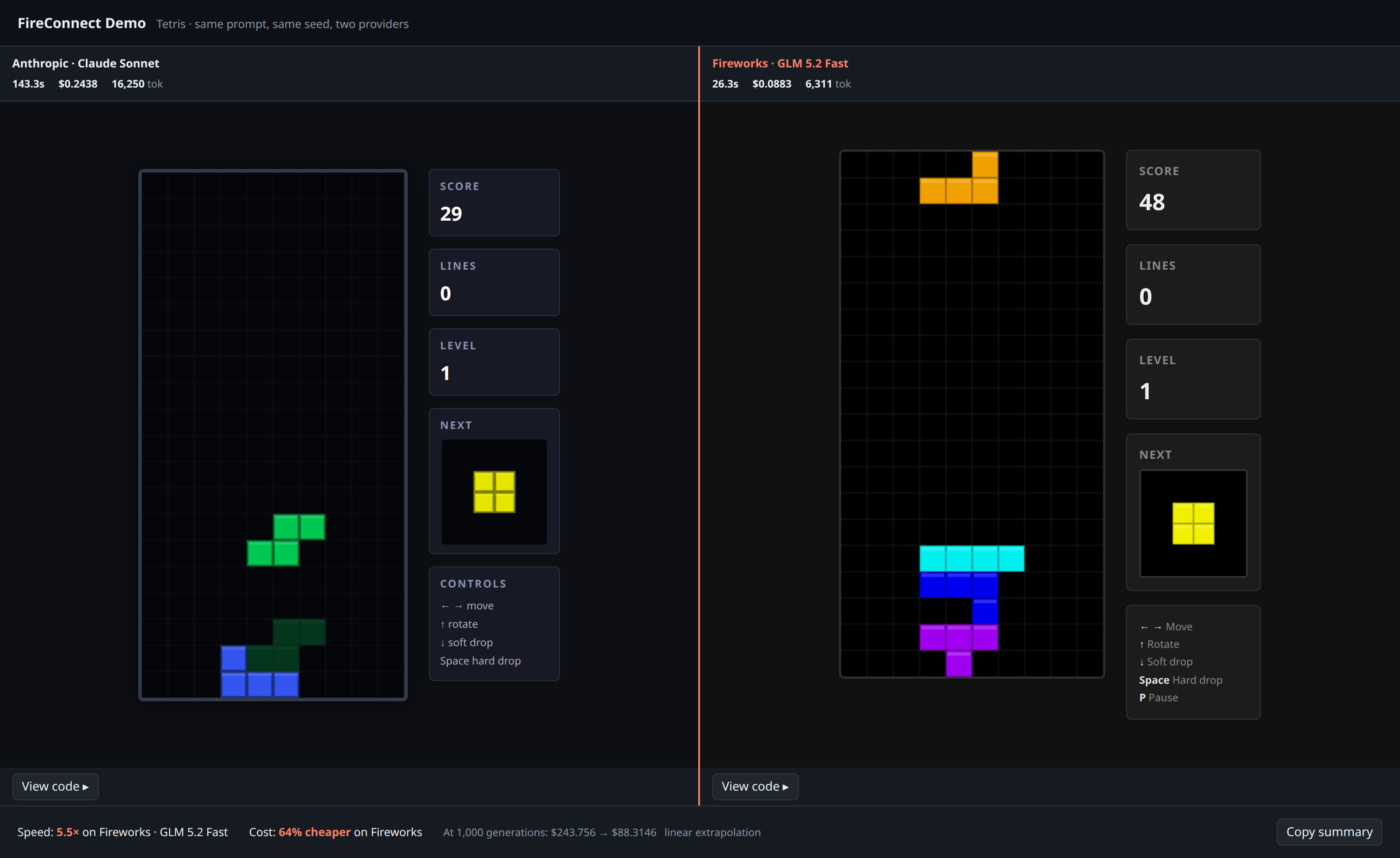
2. **Browser comparison**: both generated apps run side by side, with measured speed and cost at the bottom.
3. **Shareable artifacts**: outputs land in `./fireconnect-demo/` (`compare.html`, `result.json`, stream logs).
### Browser comparison
Side-by-side runnable apps with measured speed and cost:
 ### Terminal race
Split-pane TUI while both models stream the same prompt:
### Terminal race
Split-pane TUI while both models stream the same prompt:
 ## Prerequisites
* FireConnect installed ([overview](/docs/ecosystem/fireconnect/overview#install))
* [Claude Code](https://claude.ai/code) CLI (`claude`) on your `PATH`
* Claude Code already connected with `fireconnect claude`
Both sides use the same authentication and routing as your existing FireConnect Claude setup. The demo only supports **Claude Code** today.
## Run the demo
```bash theme={null}
fireconnect claude demo
```
That runs the default **Tetris** preset: both sides get the same prompt to build a playable game in a single HTML file.
The old top-level `fireconnect demo` form is deprecated. Use `fireconnect claude demo`.
### Try other presets
```bash theme={null}
fireconnect claude demo --prompt snake
fireconnect claude demo --prompt clock
fireconnect claude demo --prompt "Build a todo app in one HTML file"
fireconnect claude demo --prompt-file ./task.txt
```
Presets: `tetris` (default), `snake`, or `clock`. You can also pass custom task text or use `--prompt-file`.
### Pick the models
```bash theme={null}
fireconnect claude demo --left-model opus --right-model glm-fast-latest
```
The defaults are `opus` on the left and `glm-fast-latest` on the right. Pass any available model or Claude alias from your connected profile.
### Non-interactive / CI-friendly
```bash theme={null}
fireconnect claude demo --yes --no-open --json
```
| Flag | What it does |
| --------------------------- | ---------------------------------------------------------------------- |
| `--yes` | Skip the setup form |
| `--no-open` | Do not open a browser; write outputs to disk only |
| `--json` | Print a machine-readable result to stdout (skips the TUI) |
| `--out ` | Output directory (default: `./fireconnect-demo/`) |
| `--prompt-file ` | Read a custom task from a file (overrides the preset) |
| `--left-model ` | Left model (default: `opus`) |
| `--right-model ` | Right model (default: `glm-fast-latest`) |
| `--challenger ` | Alias for `--right-model` |
| `--anthropic-model ` | Alias for `--left-model` (`opus`, `sonnet`, `haiku`, or `fable`) |
| `--api-key ` | Override the Fireworks key from your environment or FireConnect config |
## Clean up
```bash theme={null}
fireconnect claude demo clean # prompts before deleting ./fireconnect-demo/
fireconnect claude demo clean --yes # delete without prompting
fireconnect claude demo clean --out /path/to/output
```
`demo clean` only removes directories that contain demo markers (`result.json`, `compare.html`, etc.), so it will not delete an unrelated folder you pointed `--out` at by mistake.
## After the demo
Liked one of the models? Set it as your daily driver:
```bash theme={null}
fireconnect claude on --model glm-5p2-fast
```
More IDs and latest vs fast guidance: [Models](/docs/ecosystem/fireconnect/models).
Want automatic cost routing instead of a fixed model? Try [FireRouter](/docs/ecosystem/firerouter/overview):
```bash theme={null}
fireconnect claude on --model firerouter
```
## How it works
* Each side runs real `claude -p` in a separate temporary working directory, using your active FireConnect Claude profile with only the model changed.
* Numbers in the comparison strip are **measured from the run**, not list-price estimates.
* If one side fails to finish, the page says so instead of fabricating a winner.
* Open `compare.html` from the output folder anytime. It inlines both apps and works offline.
## Source
The demo ships with FireConnect: [github.com/fw-ai/fireconnect](https://github.com/fw-ai/fireconnect)
## See also
* [FireConnect overview](/docs/ecosystem/fireconnect/overview)
* [Models](/docs/ecosystem/fireconnect/models)
* [CLI reference](/docs/ecosystem/fireconnect/cli-reference)
## Prerequisites
* FireConnect installed ([overview](/docs/ecosystem/fireconnect/overview#install))
* [Claude Code](https://claude.ai/code) CLI (`claude`) on your `PATH`
* Claude Code already connected with `fireconnect claude`
Both sides use the same authentication and routing as your existing FireConnect Claude setup. The demo only supports **Claude Code** today.
## Run the demo
```bash theme={null}
fireconnect claude demo
```
That runs the default **Tetris** preset: both sides get the same prompt to build a playable game in a single HTML file.
The old top-level `fireconnect demo` form is deprecated. Use `fireconnect claude demo`.
### Try other presets
```bash theme={null}
fireconnect claude demo --prompt snake
fireconnect claude demo --prompt clock
fireconnect claude demo --prompt "Build a todo app in one HTML file"
fireconnect claude demo --prompt-file ./task.txt
```
Presets: `tetris` (default), `snake`, or `clock`. You can also pass custom task text or use `--prompt-file`.
### Pick the models
```bash theme={null}
fireconnect claude demo --left-model opus --right-model glm-fast-latest
```
The defaults are `opus` on the left and `glm-fast-latest` on the right. Pass any available model or Claude alias from your connected profile.
### Non-interactive / CI-friendly
```bash theme={null}
fireconnect claude demo --yes --no-open --json
```
| Flag | What it does |
| --------------------------- | ---------------------------------------------------------------------- |
| `--yes` | Skip the setup form |
| `--no-open` | Do not open a browser; write outputs to disk only |
| `--json` | Print a machine-readable result to stdout (skips the TUI) |
| `--out ` | Output directory (default: `./fireconnect-demo/`) |
| `--prompt-file ` | Read a custom task from a file (overrides the preset) |
| `--left-model ` | Left model (default: `opus`) |
| `--right-model ` | Right model (default: `glm-fast-latest`) |
| `--challenger ` | Alias for `--right-model` |
| `--anthropic-model ` | Alias for `--left-model` (`opus`, `sonnet`, `haiku`, or `fable`) |
| `--api-key ` | Override the Fireworks key from your environment or FireConnect config |
## Clean up
```bash theme={null}
fireconnect claude demo clean # prompts before deleting ./fireconnect-demo/
fireconnect claude demo clean --yes # delete without prompting
fireconnect claude demo clean --out /path/to/output
```
`demo clean` only removes directories that contain demo markers (`result.json`, `compare.html`, etc.), so it will not delete an unrelated folder you pointed `--out` at by mistake.
## After the demo
Liked one of the models? Set it as your daily driver:
```bash theme={null}
fireconnect claude on --model glm-5p2-fast
```
More IDs and latest vs fast guidance: [Models](/docs/ecosystem/fireconnect/models).
Want automatic cost routing instead of a fixed model? Try [FireRouter](/docs/ecosystem/firerouter/overview):
```bash theme={null}
fireconnect claude on --model firerouter
```
## How it works
* Each side runs real `claude -p` in a separate temporary working directory, using your active FireConnect Claude profile with only the model changed.
* Numbers in the comparison strip are **measured from the run**, not list-price estimates.
* If one side fails to finish, the page says so instead of fabricating a winner.
* Open `compare.html` from the output folder anytime. It inlines both apps and works offline.
## Source
The demo ships with FireConnect: [github.com/fw-ai/fireconnect](https://github.com/fw-ai/fireconnect)
## See also
* [FireConnect overview](/docs/ecosystem/fireconnect/overview)
* [Models](/docs/ecosystem/fireconnect/models)
* [CLI reference](/docs/ecosystem/fireconnect/cli-reference)