> ## Documentation Index
> Fetch the complete documentation index at: https://fireworks.ai/docs/llms.txt
> Use this file to discover all available pages before exploring further.
# Batch API
> Process large-scale async workloads at a discount
Process large volumes of requests asynchronously at **50% off** [Serverless per-token prices](https://docs.fireworks.ai/serverless/pricing). Batch API is ideal for:
* Data labeling and synthetic data generation
* Training smaller models with larger ones ([distillation guide](https://fireworks.ai/blog/deepseek-r1-distillation-reasoning))
* Large-scale evaluations and benchmarking
* Document processing and more
Batch jobs automatically use [prompt caching](/guides/prompt-caching) for additional 50% cost savings on cached tokens. Maximize cache hits by placing static content first in your prompts.
## Model compatibility
Not all models support the Batch API. Before submitting a batch job, verify your target model is batch-compatible.
* **Base Models** – Any model that supports [On-Demand Deployments](https://docs.fireworks.ai/guides/ondemand-deployments) in the [Model Library](https://fireworks.ai/models)
* **Custom Models** – Your uploaded or fine-tuned models built on a batch-compatible base model
*Note: Newly added models may have a delay before being supported. See [Quantization](/models/quantization) for precision info.*
If a model does not support batch inference, submitting a job may not produce an immediate error — the job can remain in a pending state and never schedule. Always verify compatibility before submitting.
**If your batch job is not running:**
1. If validation failed, check your JSONL input — each line must be a complete, valid JSON object matching the request schema.
2. Batch jobs wait to be scheduled in a "pending" state during the selected time window, so it may not run immediately.
3. If the job has been "creating" a deployment for more than 30 minutes, contact support with your job ID.
1. Confirm the model supports batch inference (see above).
2. Check that your account has sufficient quota for batch jobs.
4. Progress may pause while waiting on capacity. The job will resume automatically.
## Getting Started
Datasets must be in JSONL format (one JSON object per line):
**Requirements:**
* **File format:** JSONL (each line is a valid JSON object)
* **Size limit:** Under 1GB
* **Required fields:** `custom_id` (unique) and `body` (request parameters)
**Example dataset:**
```json theme={null}
{"custom_id": "request-1", "body": {"messages": [{"role": "system", "content": "You are a helpful assistant."}, {"role": "user", "content": "What is the capital of France?"}], "max_tokens": 100}}
{"custom_id": "request-2", "body": {"messages": [{"role": "user", "content": "Explain quantum computing"}], "temperature": 0.7}}
{"custom_id": "request-3", "body": {"messages": [{"role": "user", "content": "Tell me a joke"}]}}
```
Save as `batch_input_data.jsonl` locally.
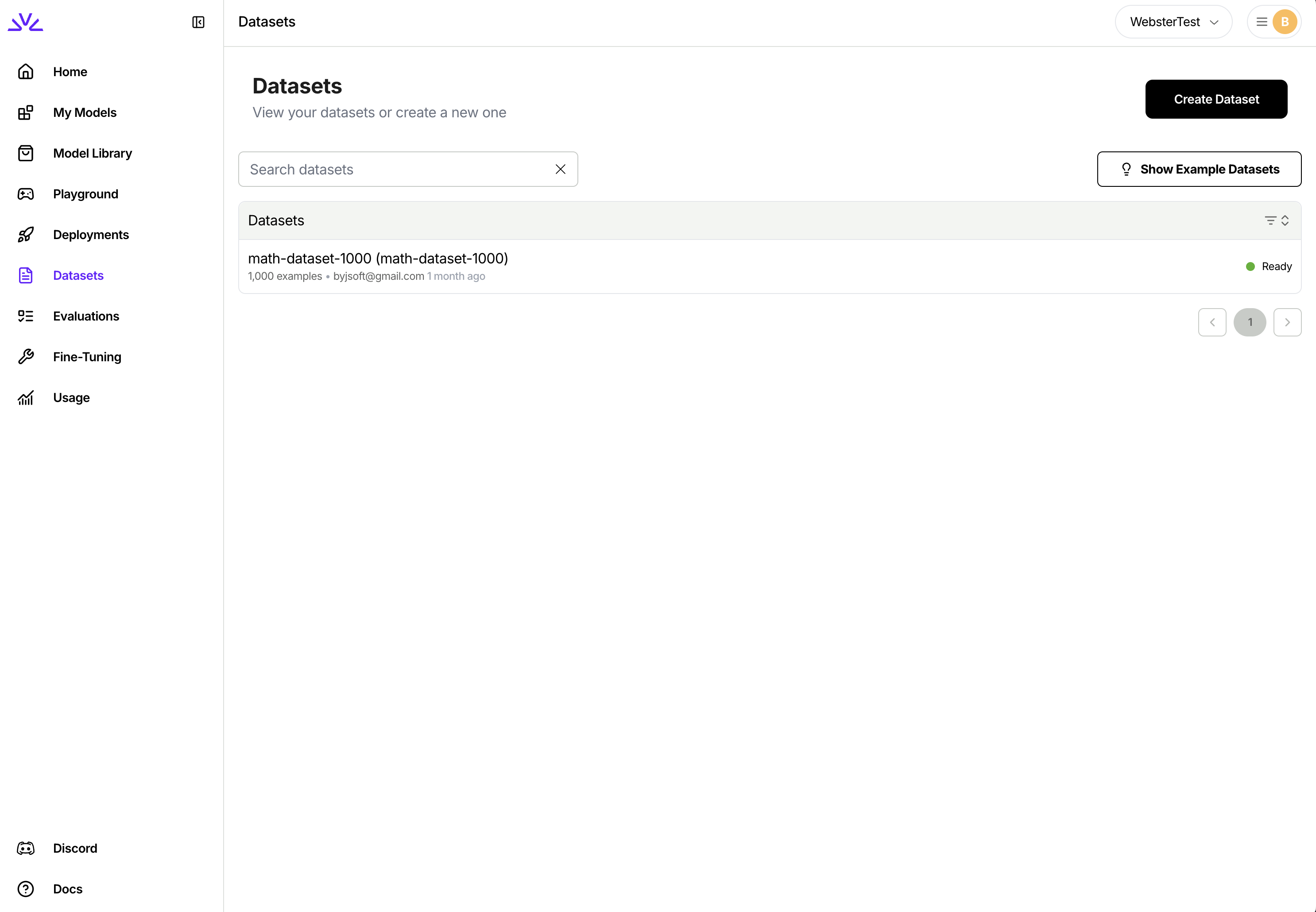
You can simply navigate to the dataset tab, click `Create Dataset` and follow the wizard.
 ```bash theme={null}
firectl dataset create batch-input-dataset ./batch_input_data.jsonl
```
You need to make two separate HTTP requests. One for creating the dataset entry and one for uploading the dataset. Full reference here: [Create dataset](/api-reference/create-dataset).
```bash theme={null}
# Create Dataset Entry
curl -X POST "https://api.fireworks.ai/v1/accounts/${ACCOUNT_ID}/datasets" \
-H "Authorization: Bearer ${API_KEY}" \
-H "Content-Type: application/json" \
-d '{
"datasetId": "batch-input-dataset",
"dataset": { "userUploaded": {} }
}'
# Upload JSONL file
curl -X POST "https://api.fireworks.ai/v1/accounts/${ACCOUNT_ID}/datasets/batch-input-dataset:upload" \
-H "Authorization: Bearer ${API_KEY}" \
-F "file=@./batch_input_data.jsonl"
```
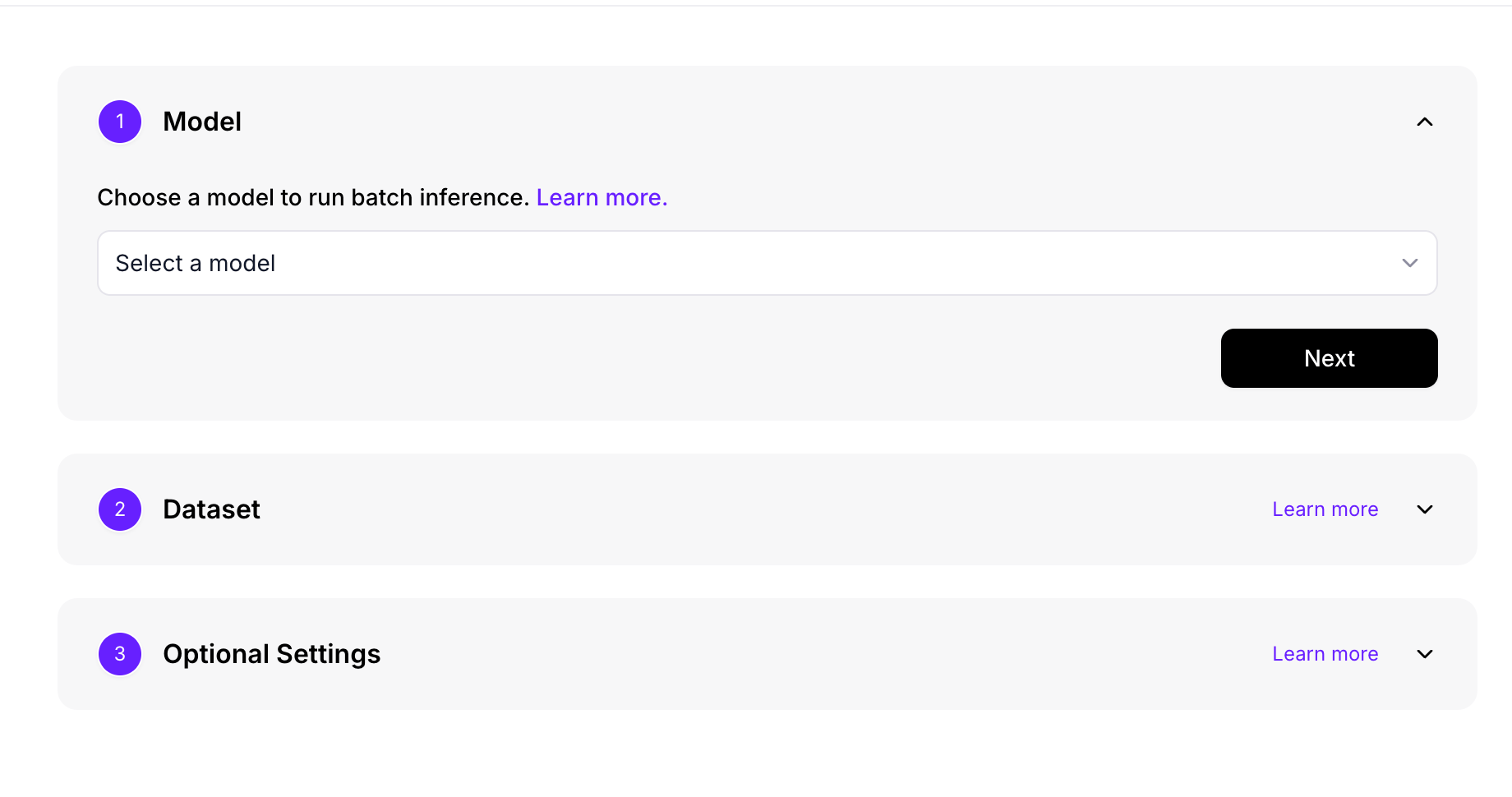
Navigate to the Batch Inference tab and click "Create Batch Inference Job". Choose your batch-eligible model from the dropdown selector:
```bash theme={null}
firectl dataset create batch-input-dataset ./batch_input_data.jsonl
```
You need to make two separate HTTP requests. One for creating the dataset entry and one for uploading the dataset. Full reference here: [Create dataset](/api-reference/create-dataset).
```bash theme={null}
# Create Dataset Entry
curl -X POST "https://api.fireworks.ai/v1/accounts/${ACCOUNT_ID}/datasets" \
-H "Authorization: Bearer ${API_KEY}" \
-H "Content-Type: application/json" \
-d '{
"datasetId": "batch-input-dataset",
"dataset": { "userUploaded": {} }
}'
# Upload JSONL file
curl -X POST "https://api.fireworks.ai/v1/accounts/${ACCOUNT_ID}/datasets/batch-input-dataset:upload" \
-H "Authorization: Bearer ${API_KEY}" \
-F "file=@./batch_input_data.jsonl"
```
Navigate to the Batch Inference tab and click "Create Batch Inference Job". Choose your batch-eligible model from the dropdown selector:
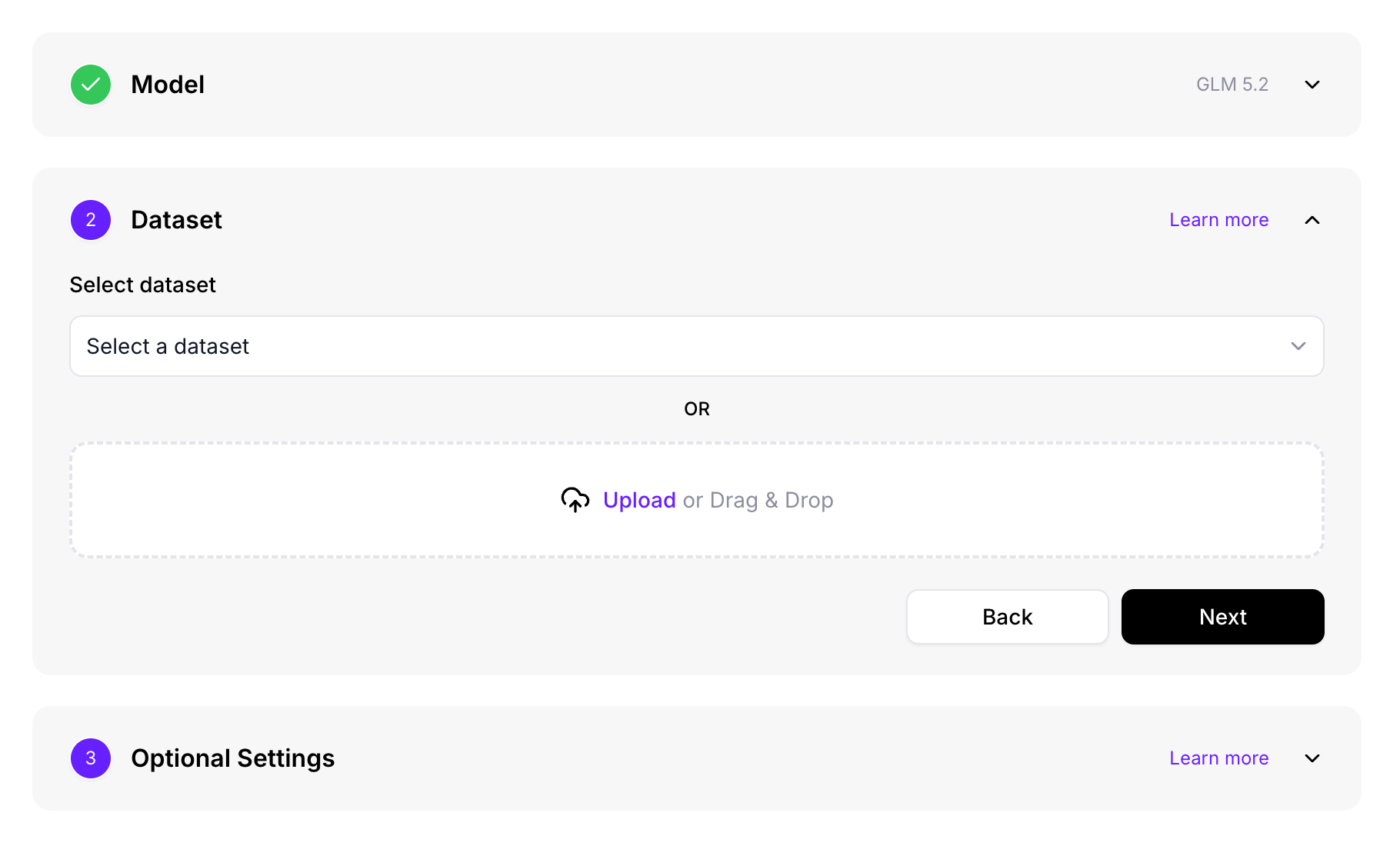
 Select your dataset:
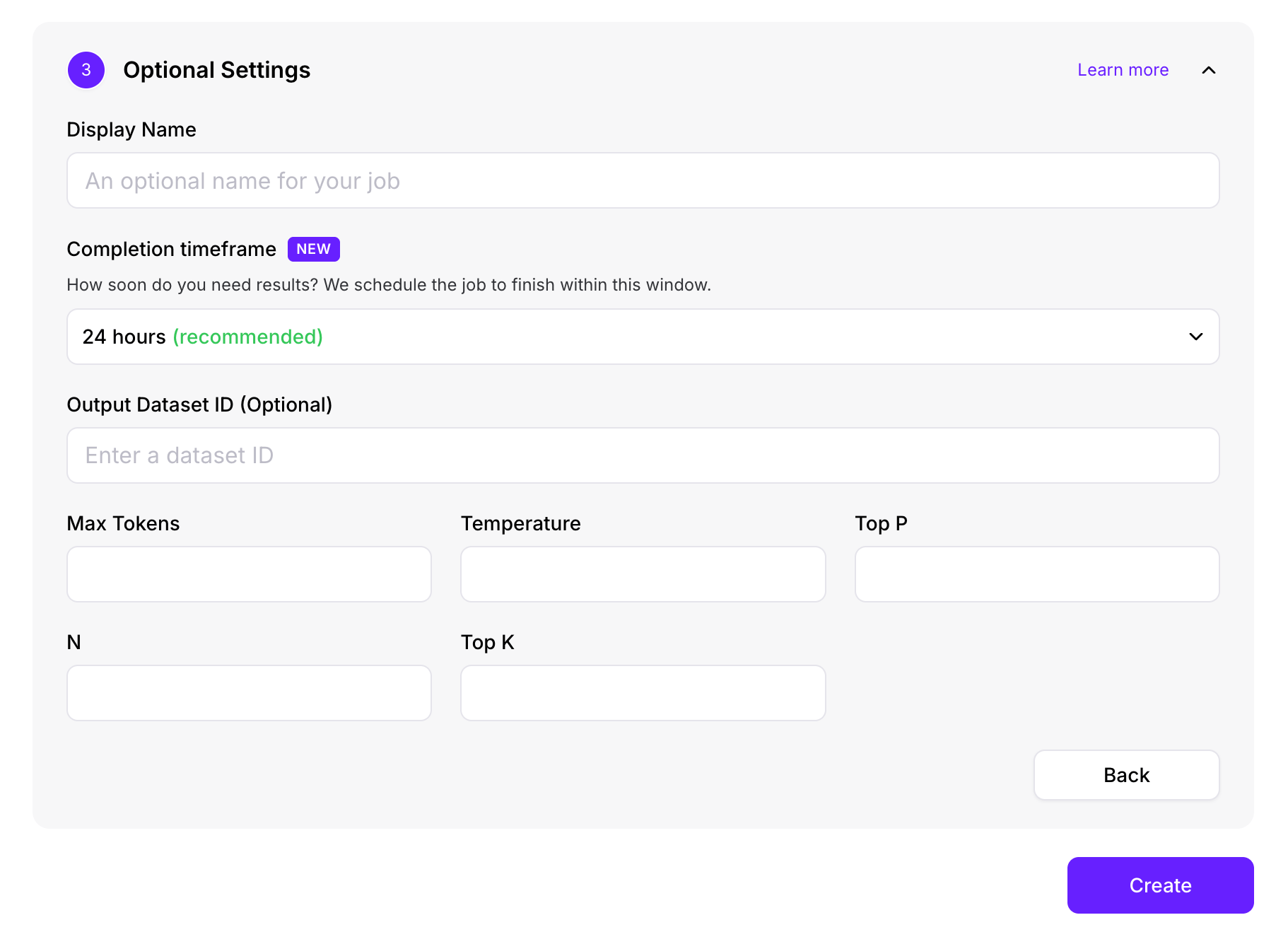
 Configure optional settings:
 ```bash theme={null}
firectl batch-inference-job create \
--model accounts/fireworks/models/llama-v3p1-8b-instruct \
--input-dataset-id batch-input-dataset
```
With additional parameters:
```bash theme={null}
firectl batch-inference-job create \
--job-id my-batch-job \
--model accounts/fireworks/models/llama-v3p1-8b-instruct \
--input-dataset-id batch-input-dataset \
--output-dataset-id batch-output-dataset \
--max-tokens 1024 \
--temperature 0.7 \
--top-p 0.9
```
```bash theme={null}
curl -X POST "https://api.fireworks.ai/v1/accounts/${ACCOUNT_ID}/batchInferenceJobs?batchInferenceJobId=my-batch-job" \
-H "Authorization: Bearer ${API_KEY}" \
-H "Content-Type: application/json" \
-d '{
"model": "accounts/fireworks/models/llama-v3p1-8b-instruct",
"inputDatasetId": "accounts/'${ACCOUNT_ID}'/datasets/batch-input-dataset",
"outputDatasetId": "accounts/'${ACCOUNT_ID}'/datasets/batch-output-dataset",
"inferenceParameters": {
"maxTokens": 1024,
"temperature": 0.7,
"topP": 0.9
}
}'
```
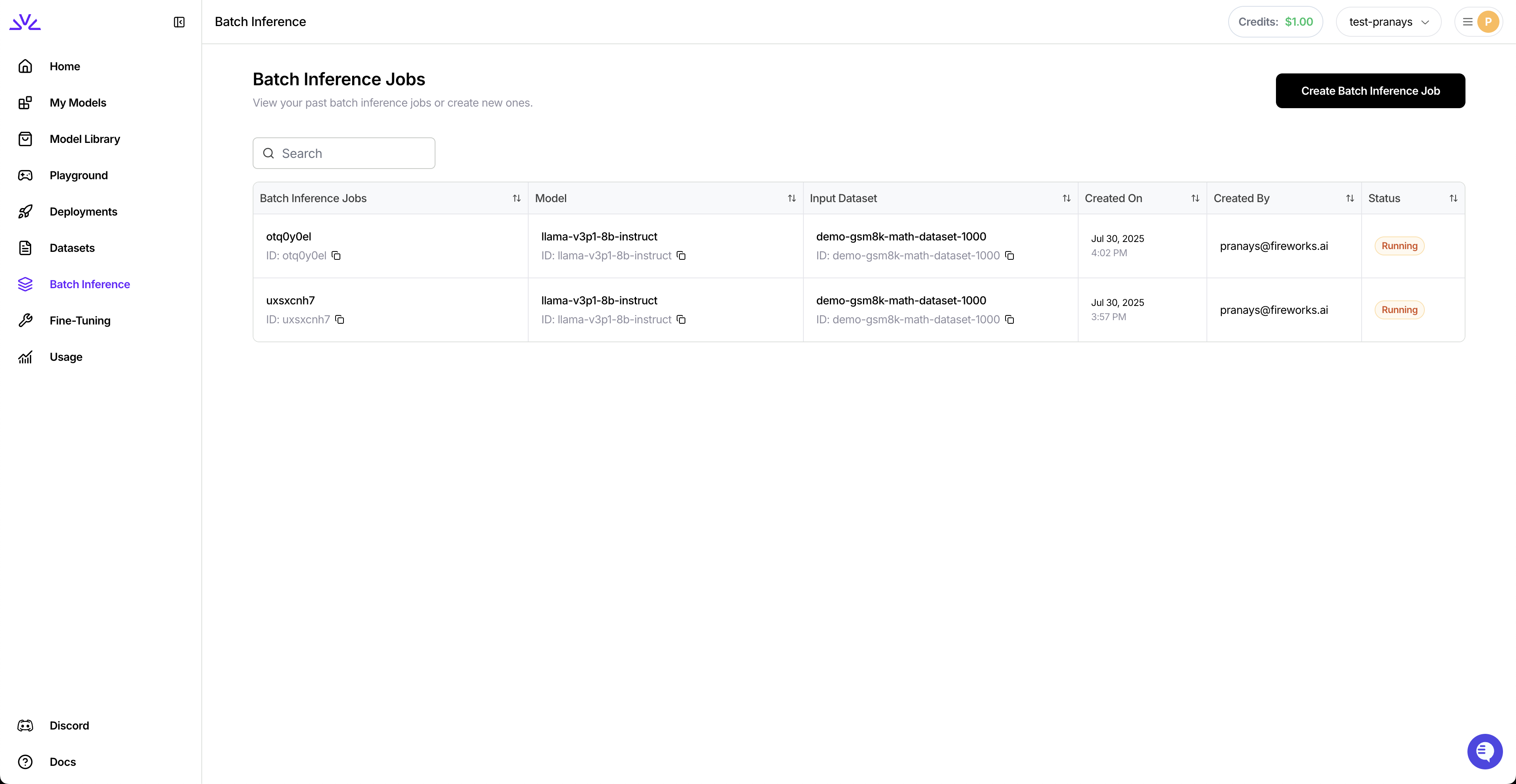
View all your batch inference jobs in the dashboard:
```bash theme={null}
firectl batch-inference-job create \
--model accounts/fireworks/models/llama-v3p1-8b-instruct \
--input-dataset-id batch-input-dataset
```
With additional parameters:
```bash theme={null}
firectl batch-inference-job create \
--job-id my-batch-job \
--model accounts/fireworks/models/llama-v3p1-8b-instruct \
--input-dataset-id batch-input-dataset \
--output-dataset-id batch-output-dataset \
--max-tokens 1024 \
--temperature 0.7 \
--top-p 0.9
```
```bash theme={null}
curl -X POST "https://api.fireworks.ai/v1/accounts/${ACCOUNT_ID}/batchInferenceJobs?batchInferenceJobId=my-batch-job" \
-H "Authorization: Bearer ${API_KEY}" \
-H "Content-Type: application/json" \
-d '{
"model": "accounts/fireworks/models/llama-v3p1-8b-instruct",
"inputDatasetId": "accounts/'${ACCOUNT_ID}'/datasets/batch-input-dataset",
"outputDatasetId": "accounts/'${ACCOUNT_ID}'/datasets/batch-output-dataset",
"inferenceParameters": {
"maxTokens": 1024,
"temperature": 0.7,
"topP": 0.9
}
}'
```
View all your batch inference jobs in the dashboard:
 ```bash theme={null}
# Get job status
firectl batch-inference-job get my-batch-job
# List all batch jobs
firectl batch-inference-job list
```
```bash theme={null}
# Get specific job
curl -X GET "https://api.fireworks.ai/v1/accounts/${ACCOUNT_ID}/batchInferenceJobs/my-batch-job" \
-H "Authorization: Bearer ${API_KEY}"
# List all jobs
curl -X GET "https://api.fireworks.ai/v1/accounts/${ACCOUNT_ID}/batchInferenceJobs" \
-H "Authorization: Bearer ${API_KEY}"
```
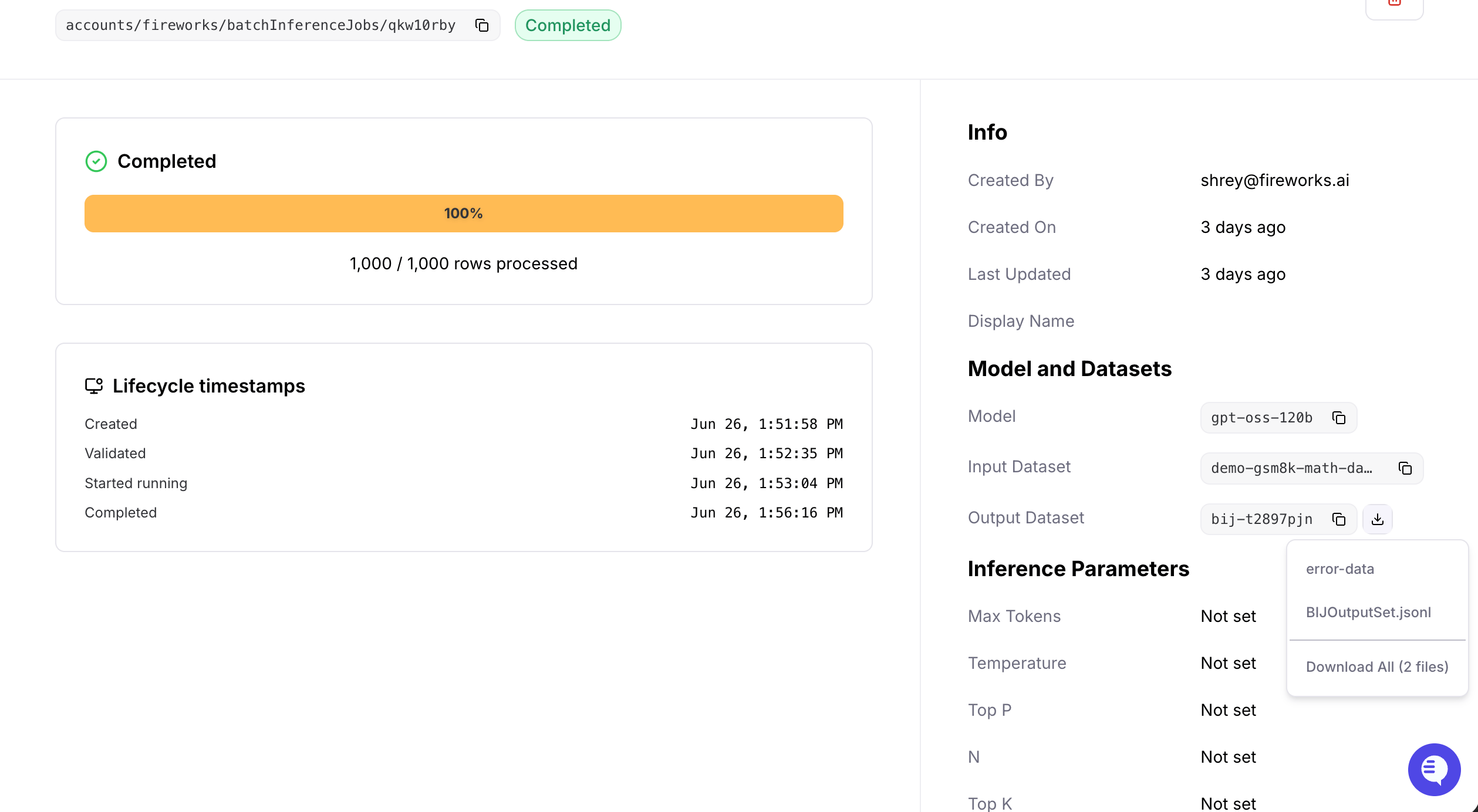
Navigate to the output dataset and download the results:
```bash theme={null}
# Get job status
firectl batch-inference-job get my-batch-job
# List all batch jobs
firectl batch-inference-job list
```
```bash theme={null}
# Get specific job
curl -X GET "https://api.fireworks.ai/v1/accounts/${ACCOUNT_ID}/batchInferenceJobs/my-batch-job" \
-H "Authorization: Bearer ${API_KEY}"
# List all jobs
curl -X GET "https://api.fireworks.ai/v1/accounts/${ACCOUNT_ID}/batchInferenceJobs" \
-H "Authorization: Bearer ${API_KEY}"
```
Navigate to the output dataset and download the results:
 ```bash theme={null}
firectl dataset download batch-output-dataset
```
```bash theme={null}
# Get download endpoint and save response
curl -s -X GET "https://api.fireworks.ai/v1/accounts/${ACCOUNT_ID}/datasets/batch-output-dataset:getDownloadEndpoint" \
-H "Authorization: Bearer ${API_KEY}" \
-d '{}' > download.json
# Extract and download all files
jq -r '.filenameToSignedUrls | to_entries[] | "\(.key) \(.value)"' download.json | \
while read -r object_path signed_url; do
fname=$(basename "$object_path")
echo "Downloading → $fname"
curl -L -o "$fname" "$signed_url"
done
```
The output dataset contains two files: a **results file** (successful responses in JSONL format) and an **error file** (failed requests with debugging info).
## Reference
Batch jobs progress through several states:
| State | Description |
| -------------- | ------------------------------------------------------------------------------ |
| **VALIDATING** | Dataset is being validated for format requirements |
| **PENDING** | Job is queued and waiting for resources |
| **RUNNING** | Actively processing requests |
| **COMPLETED** | All requests successfully processed |
| **FAILED** | Unrecoverable error occurred (check status message) |
| **EXPIRED** | Exceeded chosen time limit (12, 24, 48, 72 hrs). Completed requests are saved. |
* **Base Models** – Any model that supports [On-Demand Deployments](https://docs.fireworks.ai/guides/ondemand-deployments) in the [Model Library](https://fireworks.ai/models)
* **Custom Models** – Your uploaded or fine-tuned models built on a batch-compatible base model
*Note: Newly added models may have a delay before being supported. See [Quantization](/models/quantization) for precision info.*
* **Per-request limits:** Same as [Chat Completion API limits](/api-reference/post-chatcompletions)
* **Input dataset:** Max 1GB
* **Output dataset:** Max 8GB (job may expire early if limit is reached)
* **Job expiration:** Select from 12, 24, 48, 72 hours maximum in Optional Settings
Jobs expire after 24 hours. Completed rows are billed and saved to the output dataset.
**Resume processing:**
```bash theme={null}
firectl batch-inference-job create \
--continue-from original-job-id \
--model accounts/fireworks/models/llama-v3p1-8b-instruct \
--output-dataset-id new-output-dataset
```
This processes only unfinished/failed requests from the original job.
**Download complete lineage:**
```bash theme={null}
firectl dataset download output-dataset-id --download-lineage
```
Downloads all datasets in the continuation chain.
* **Validate thoroughly:** Check dataset format before uploading
* **Descriptive IDs:** Use meaningful `custom_id` values for tracking
* **Optimize tokens:** Set reasonable `max_tokens` limits
* **Monitor progress:** Track long-running jobs regularly
* **Cache optimization:** Place static content first in prompts
## Next Steps
Maximize cost savings with automatic prompt caching
Create custom models for your batch workloads
Full API documentation for Batch API
```bash theme={null}
firectl dataset download batch-output-dataset
```
```bash theme={null}
# Get download endpoint and save response
curl -s -X GET "https://api.fireworks.ai/v1/accounts/${ACCOUNT_ID}/datasets/batch-output-dataset:getDownloadEndpoint" \
-H "Authorization: Bearer ${API_KEY}" \
-d '{}' > download.json
# Extract and download all files
jq -r '.filenameToSignedUrls | to_entries[] | "\(.key) \(.value)"' download.json | \
while read -r object_path signed_url; do
fname=$(basename "$object_path")
echo "Downloading → $fname"
curl -L -o "$fname" "$signed_url"
done
```
The output dataset contains two files: a **results file** (successful responses in JSONL format) and an **error file** (failed requests with debugging info).
## Reference
Batch jobs progress through several states:
| State | Description |
| -------------- | ------------------------------------------------------------------------------ |
| **VALIDATING** | Dataset is being validated for format requirements |
| **PENDING** | Job is queued and waiting for resources |
| **RUNNING** | Actively processing requests |
| **COMPLETED** | All requests successfully processed |
| **FAILED** | Unrecoverable error occurred (check status message) |
| **EXPIRED** | Exceeded chosen time limit (12, 24, 48, 72 hrs). Completed requests are saved. |
* **Base Models** – Any model that supports [On-Demand Deployments](https://docs.fireworks.ai/guides/ondemand-deployments) in the [Model Library](https://fireworks.ai/models)
* **Custom Models** – Your uploaded or fine-tuned models built on a batch-compatible base model
*Note: Newly added models may have a delay before being supported. See [Quantization](/models/quantization) for precision info.*
* **Per-request limits:** Same as [Chat Completion API limits](/api-reference/post-chatcompletions)
* **Input dataset:** Max 1GB
* **Output dataset:** Max 8GB (job may expire early if limit is reached)
* **Job expiration:** Select from 12, 24, 48, 72 hours maximum in Optional Settings
Jobs expire after 24 hours. Completed rows are billed and saved to the output dataset.
**Resume processing:**
```bash theme={null}
firectl batch-inference-job create \
--continue-from original-job-id \
--model accounts/fireworks/models/llama-v3p1-8b-instruct \
--output-dataset-id new-output-dataset
```
This processes only unfinished/failed requests from the original job.
**Download complete lineage:**
```bash theme={null}
firectl dataset download output-dataset-id --download-lineage
```
Downloads all datasets in the continuation chain.
* **Validate thoroughly:** Check dataset format before uploading
* **Descriptive IDs:** Use meaningful `custom_id` values for tracking
* **Optimize tokens:** Set reasonable `max_tokens` limits
* **Monitor progress:** Track long-running jobs regularly
* **Cache optimization:** Place static content first in prompts
## Next Steps
Maximize cost savings with automatic prompt caching
Create custom models for your batch workloads
Full API documentation for Batch API