
429 Too Many Requests or 503 Service Overloaded. To avoid 429s, you need to stay below our adaptive rate limits. To reduce the likelihood of 503s, you can upgrade to Priority tier.
What are your rate limits?
There are three metrics we use to rate limit accounts:- Total Prompt TPM — input tokens per minute (cached + uncached).
- Uncached Prompt TPM — uncached input tokens per minute.
- Generated TPM — output tokens per minute.
Fast, Priority, and US-only variants of a model share the same tier and ceilings as the base model. Models without a known parameter count use Large ceilings.
Models by tier
Models not listed here are tiered by total parameter count using the thresholds above.
Based on your usage, your adaptive limits will grow and shrink within these ceilings. If your traffic ramps up too quickly, you will get 429s.
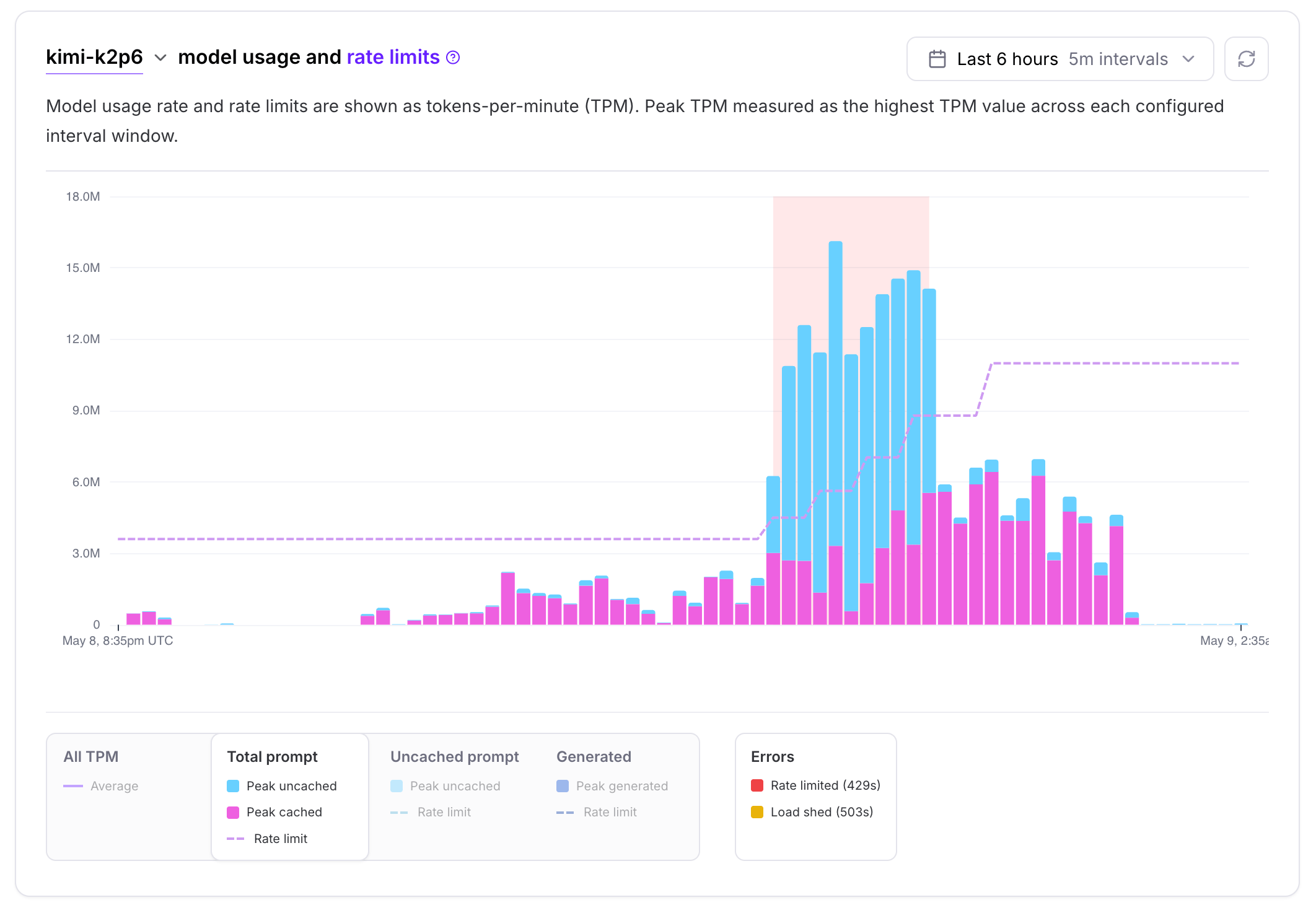
How do adaptive limits change?
Your limit for each model starts at a default value and grows in steps as you use it. If your recent one-minute usage is above 50% of your current limit, the limit increases by 25%, and no more than once every 15 minutes, until it reaches your ceiling. If you stop using it, the limit shrinks slowly and eventually resets. Each of the three metrics (Total Prompt TPM, Uncached Prompt TPM, and Generated TPM) has its own limit and changes on its own. Heavy usage on one metric does not change the other two.Your ceiling
The ceiling is the highest your limit can grow. Two things set it:- Model size picks the row in the table above.
- Your spending tier sets how much of that row you can reach. The table shows the maximum ceilings, available at Tier 3 and above. Tiers below Tier 3 have lower ceilings.
When limits go up, down, or reset
A few details:
- A decrease is skipped if your recent usage would be at least 50% of the lower limit. This keeps the limit from dropping and then immediately climbing back up.
- With Reserved Throughput, these thresholds apply to burst usage above your reservation and to the adaptive portion of your limit. Your reservation is added to that adaptive limit, and usage within the reservation does not count toward the thresholds.
- Resets do not apply to accounts with a custom limit or a reservation for that model.
- If you have reserved throughput, your limit never drops below your reservation.
How slowly limits shrink
Say your Total Prompt TPM limit is 10,000,000 and your traffic drops to a steady 1,000,000 tokens per minute:
If you stop sending traffic completely, you don’t go through these steps. After more than 72 hours with no traffic, the limit resets to the starting default.
Example: ramping up
Say your current Total Prompt TPM limit is 1,000,000.- Send more than 500,000 but less than 1,000,000 prompt tokens per minute. This keeps you above half your limit without hitting 429s.
- More than 15 minutes later, your limit rises to 1,250,000.
- Raise your traffic to match, staying between 625,000 and 1,250,000.
- Repeat until your limit stops rising.
Checking your current limit
Check your current limit in the Serverless dashboard. The same limits are also returned in the response headers on each request. Header values are tokens per minute, so you can compare them directly with the TPM ceilings above.FAQ
Am I guaranteed successful responses up to my rate limit?
Am I guaranteed successful responses up to my rate limit?
No. Staying within your rate limits does not guarantee that every request succeeds. When a deployment is busy, your traffic can still be load shed, and those responses are
503 Service Overloaded. To decrease the chance of being load shed, you can use Priority tier, which is prioritized during high load.How are rate limits scoped?
How are rate limits scoped?
Rate limits are scoped per account and per model. Fast and regular model variants have separate limits. Priority tier and regular requests share the same rate limits for a given model.
How is my model's ceiling tier determined?
How is my model's ceiling tier determined?
Ceiling tiers are based on the model’s total parameter count: Small (< 600B), Medium (600B – < 1.6T), or Large (≥ 1.6T). See Model size tiers for the ceiling values and Models by tier for where each Serverless model falls.
What should I do first when I see 429s?
What should I do first when I see 429s?
First, try exponential backoff when retrying.
How do I get higher limits sooner?
How do I get higher limits sooner?
Reach out to inquiries@fireworks.ai for a custom solution if either of these applies:
- You need higher than the defaults from day one. Your launch traffic exceeds the starting limit and you can’t wait for the adaptive ramp.
- You’re ramping past the highest upper bound. You are already at the highest account Spending Tier and the adaptive rate limits are not growing.