
How it works
Specialized Model Inference runs your LoRA adapters on Fireworks’ shared serverless pool. You don’t create or pay for a deployment. You load an adapter, call it like any serverless model, and pay per token at the base model’s price.Supported models and limits
Adapters must be trained on a supported model:
Adapters load on this serverless base model:
We plan to support more base models over time. Adapters trained on any other base model can’t be loaded onto serverless - please use a dedicated deployment.
Each account can load up to 3 LoRA adapters per base model at a time. Loading a fourth returns
ResourceExhausted. Unload an adapter to free up a slot. If you need more slots, contact inquiries@fireworks.ai or your account team.
Get started
Go from a dataset to a live adapter in three steps. You need firectl 1.8.15 or later.Setup: install firectl, sign in and set your variables
Setup: install firectl, sign in and set your variables
1
Install or upgrade firectl
2
Sign in
-a <ACCOUNT_ID> on each command, or check which account is active before loading anything.3
Set your variables
Fill these in once. Every command below reads them.The examples name the adapter
my-lora and train it on GLM 5.3 Flash (accounts/fireworks/models/glm-5p3-flash). Replace my-lora with your adapter’s ID wherever it appears.Step 1. Train a LoRA adapter on a supported model
Skip this step if you already have an adapter in theREADY state on a supported base model.
- Serverless Training API
- Managed Training (firectl)
- Managed Training (UI)
- Import an adapter
Train on Fireworks’ shared serverless trainer pool with the Serverless Training API. You pay per token and don’t provision a trainer.The adapter is ready to load when its state is
1
Install the cookbook
2
Run serverless SFT
Save this as
train_my_lora.py in the cookbook folder and point dataset at a chat-format JSONL file. serverless=True runs the job on the serverless trainer pool. lora_rank must be 64 or lower. When training finishes, output_model_id saves the adapter to your account as my-lora.3
Check the adapter
READY.Step 2. Deploy it on serverless
- firectl
- REST
text
text
firectl model get my-lora shows the same copies under Deployed Model Refs. A trained adapter with no refs is READY but not loaded, and calls to it return 404.A copy can sit in DEPLOYING until it receives its first request. If the state hasn’t moved after the load command returned, send one request; the first call completes the load.Step 3. Call the serverless endpoint
Send the same prompt to the base model and to the adapter, and compare the two replies. The example needs jq.GLM 5.3 Flash is a reasoning model and thinks at maximum effort unless you set
reasoning_effort. Without it, a 300-token cap can be used up by the hidden reasoning and content comes back empty. Set reasoning_effort to low for an adapter trained on short answers, or raise max_tokens.Which model string to use
There is no#serverless suffix. Use one of these:
Clean up: unload the adapter
Unloading frees one of your account’s 3 adapter slots for that base model. firectl takes the adapter ID; REST takes the deployed model ID.- firectl
- REST
--wait returns once the adapter is fully unloaded. Without it, the command returns right away and calls to the adapter can keep succeeding for a short time.Try a public adapter
Fireworks keeps a public adapter loaded on serverless. Any account can call it with an API key, and you don’t need to load it.accounts/fireworks/models/glm5p3-flash-us-caveman-lora is a rank-64 adapter on GLM 5.3 Flash, trained to answer in as few words as possible.
- curl
- Python (OpenAI client)
text
Serverless or dedicated?
Pricing
You pay per token at the base model’s serverless price, for the tokens the adapter processes. There is no charge for loading an adapter, for keeping it loaded, or for the time it sits idle. Training is billed separately by the training product you used.Performance
Latency
- Loading takes under 5 minutes.
- The first request after loading a LoRA adapter downloads it onto a GPU and can take up to a minute. Set the client timeout to at least 300 seconds.
- Later requests have much lower latency, about the base model’s speed.
Rate limits
Adapter traffic has its own rate limit, separate from base-model traffic, with the same quota as the GLM 5.3 Flash serverless rate limits. When you exceed it, requests return429. Retry with exponential backoff.
Quality
Training is run at a higher numeric precision than serving. On serverless, the model may be quantized to improve performance. Fireworks runs rigorous tests on quality and we also recommend that users evaluate task-level metrics on a sufficiently large held-out set. If you need higher-precision serving, please use a dedicated deployment.Observability
You can see traffic split by LoRA adapter on the Serverless tab of the Fireworks dashboard.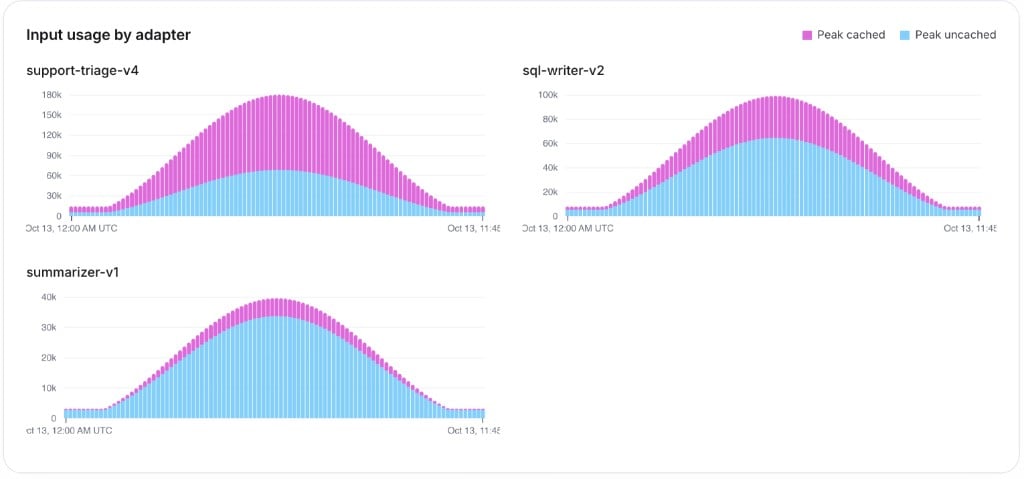
Access and privacy
- Only the account that owns an adapter can call it. Other accounts get
404. Public adapters, like the one above, are the exception. - Your adapters run on GPUs shared with other customers’ adapters.
- Model-access policies apply through the base model: allowing a base model allows its adapters, and blocking it blocks them.
Troubleshooting
Next steps
API reference
Load, list, get and unload adapters over REST
Multi-LoRA on dedicated
When serverless stops being the right fit